


Elecrow
ThinkNode M7 LoRa Gateway Node | PoE/USB powered
ThinkNode M7 LoRa Gateway Node | PoE/USB powered
Notify me when back in stock
We'll only use your email for this notification.
Couldn't load pickup availability
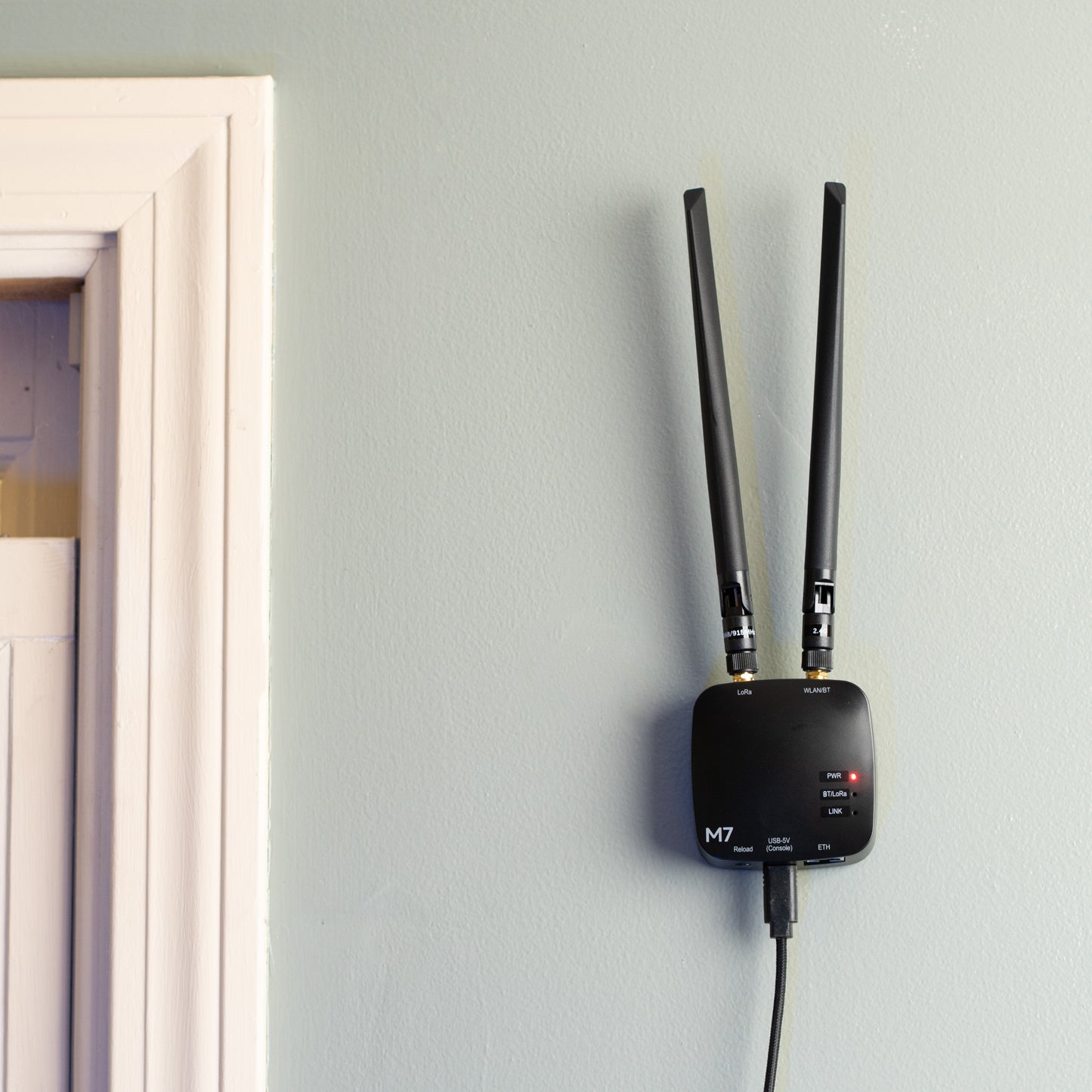
The ThinkNode M7 from Elecrow is a fixed gateway node for Meshtastic™ and MeshCore™, designed to be the permanent anchor of your mesh. Power it over PoE or plain USB-C, connect it to your network by Ethernet or Wi-Fi, mount it wherever the signal is best, and it stays online 24/7. Pick your protocol in the dropdown above and we flash and configure it immediately before shipping, so it joins your mesh the moment you plug it in.
Most meshes have the same weak spot: no reliable node at home. A handheld on a windowsill with a small battery and a compromised antenna position is not infrastructure. The M7 is, and it never needs charging or babysitting.
Who it's for
- Mesh network builders who want a proper base station in the attic or top floor holding down their coverage, on either protocol
- MeshCore™ operators who need an always-on room server or repeater that can't be allowed to go dark
- The prepared who want a family communication hub that stays on the mesh whether or not anyone is home
- MQTT and home automation tinkerers bridging their local mesh to Home Assistant, map servers, or a private broker over wired Ethernet
- Local mesh communities filling indoor coverage gaps in towns, shops, and barns where solar nodes don't make sense
Key Benefits
- 🔌 Power It Your Way Any USB-C source runs it, or go PoE (IEEE 802.3af) and deliver power and network over a single Ethernet cable to spots no outlet reaches
- 🏠 Built to Stay Put No battery, no screen, no charging schedule. It trades the pocket features for a mounting plate and permanent uptime
- 📡 Network-Connected Mesh Ethernet and Wi-Fi connect your mesh to your apps, MQTT, and map servers across your LAN
- ⚙️ Your Protocol, Pre-Flashed Choose Meshtastic™ or MeshCore™ (officially supported since v1.17.0) at checkout. We flash the latest stable firmware and configure it right before shipping, not months ago on a shelf. Reflash between protocols yourself anytime
Connection options
As a companion device, you can connect to the M7 a number of ways to read and send messages on the mesh. All four work on Meshtastic™, and MeshCore™ v1.17.0 covers the same ground with its companion firmware:
- Bluetooth Power it via USB or PoE and pair a phone or computer over Bluetooth, exactly like any handheld node. Works with the Meshtastic app or the MeshCore app.
- Wi-Fi Power it via USB or PoE, join it to your Wi-Fi network, then connect from any device on the same network. On Meshtastic, that's the mobile app via the node's IP address or a browser at client.meshtastic.org; on MeshCore, the companion app connects over Wi-Fi the same way. No pairing, no Bluetooth range limit.
- USB A single USB-C cable provides power and a serial connection to an Android device or computer, on either protocol.
- Ethernet / PoE One cable provides power and puts the node on your wired network. Both protocols support a wired companion connection on the M7 (MeshCore added its Ethernet companion interface for this board in v1.17.0), giving you the same app access as Wi-Fi with the reliability of a wired link.
Deployment configurations
- Home base station The classic use, on either firmware. On Meshtastic™, set the role to CLIENT_BASE, favorite your handhelds and trackers, and the M7 prioritizes relaying their traffic through its superior position. On MeshCore™, run the companion firmware as your fixed home node. Either way, your pocket nodes suddenly perform like they're on the roof.
- Repeater Deploy it purely as infrastructure to relay traffic in an indoor dead zone: a warehouse, a campus building, a valley-floor shop. MeshCore has a dedicated repeater firmware built for exactly this. On Meshtastic, use ROUTER only if the node has genuinely commanding elevation; misused routers are the leading cause of degraded mesh performance.
- MeshCore room server This is where the M7's form factor really earns its keep. A room server is a store-and-forward message hub (think BBS for your mesh): members post to it, and it holds messages for nodes that were out of range or powered off. That only works if the server itself never goes down, which is exactly what a PoE-powered node on a mounting plate is for.
- MQTT gateway On Meshtastic, enable MQTT and the M7 bridges your local RF mesh to the wider world over its wired connection: uplink to the public broker and community maps, or downlink to your own private broker for Home Assistant automations, logging, and alerting.
- Observer node On Meshtastic™, leave it uplinked to MQTT and connected over the network and it becomes a monitoring window into your mesh: watch traffic, node lists, and signal reports from the web client without touching your daily-carry radio. The MeshCore™ community has a parallel observer ecosystem feeding maps and analyzers like LetsMesh; it currently relies on community firmware and bridges rather than stock MeshCore, so check device support before buying for that specific purpose.
✅ No Cell Towers
✅ No License Required
✅ No Subscriptions
✅ No SIM Cards
✅ Internet Optional (the mesh works with or without it)
✅ Free, Open-Source Firmware & Apps
Key Features
- Semtech LR1110 LoRa Radio Modern transceiver supporting US 915MHz and EU 868MHz, with an external antenna on an RP-SMA connector so you can upgrade to a higher-gain antenna anytime.
- ESP32-S3 Dual-Core Processor 240MHz dual-core MCU with 8MB PSRAM handles mesh traffic, network bridging, and MQTT without breaking a sweat.
- Standard Active PoE IEEE 802.3af, 37-57V DC, compatible with any compliant PoE switch or injector. No proprietary passive PoE nonsense.
- Mounting Plate Included The rear-mount plate screws to a wall or stud, or zip ties to a rafter, mast, or conduit. The node clips on and off the plate, so firmware updates don't mean unscrewing hardware.
- Status LEDs Power, LoRa activity, and Bluetooth indicators give you at-a-glance health checks without opening an app.
Where to install it
Height and clear surroundings beat everything else: the attic, a top-floor closet, high on a garage or barn wall, a window with a good view of your area. If there's an outlet nearby, USB-C power and Wi-Fi get you running with zero infrastructure. If the best spot has no power at all, that's what PoE is for: one cheap Ethernet cable replaces the power adapter, the extension cord, and the compromise location. Keep it indoors or inside a weatherproof enclosure; the plastic housing is not rated for direct weather exposure.
Specifications
| Frequency | 915 MHz (US) or 868 MHz (EU) |
| LoRa Transceiver | Semtech LR1110 |
| MCU | ESP32-S3 dual-core, 240MHz, 8MB PSRAM, 4MB flash |
| Ethernet | RJ45, 10/100 Mbps, PoE (IEEE 802.3af, 37-57V DC) |
| USB | USB-C, 5V/1A (power and serial) |
| Wi-Fi / Bluetooth | 2.4GHz 802.11 b/g/n, Bluetooth 5.0 / BLE |
| Antenna Connector | RP-SMA Female (external LoRa antenna) |
| Firmware | Meshtastic™ or MeshCore™, your choice, flashed before shipping |
| Mounting | Rear-mount plate (screws or zip ties), wall, or desktop |
| Operating Temperature | -20°C to 70°C |
| Dimensions | 74mm x 74mm x 33mm (without antenna) |
| Weight | 80g (without antenna) |
What's in the Box
- ThinkNode M7 gateway node, flashed with your choice of firmware
- LoRa antenna
- WLAN/BT antenna
- Mounting plate (base)
- Mounting screws
- USB-A to USB-C cable
- User manual
Note: a PoE switch or injector is not included. The M7 also runs on standard USB-C power.
Compatibility
- Runs Meshtastic™ or MeshCore™ (companion, repeater, and room server firmware, officially supported since v1.17.0). Choose either at checkout, and reflash between them yourself anytime
- Upgrade coverage with a higher-gain 915 MHz antenna on the RP-SMA connector
FAQ
Does "gateway" mean it needs the internet?
No. The mesh itself is pure LoRa radio and works with zero internet, like any other node. The network features are optional extras. Unplug the Ethernet and the M7 keeps meshing.
Meshtastic or MeshCore: which should I pick in the dropdown?
Whichever your local mesh runs. The two protocols don't talk to each other, so match your community. If you're building your own private network from scratch, the M7 works well as the fixed hub of either: a CLIENT_BASE station on Meshtastic, or a repeater or room server on MeshCore. And your choice isn't permanent: reflashing between protocols is easy and reversible.
Do I need a PoE switch or injector?
Only for single-cable installation or wired networking. If you don't have PoE gear, the included USB-C cable and any 5V/1A adapter power it fine, and you can connect to your network wirelessly over WiFi if you want to.
Can I mount it outside?
Not directly. The M7 is an indoor device with no waterproof rating. Attics, garages, barns, and covered porches are fine; for a fully exposed outdoor node, that's what a solar node like the Beacon is for.
Share


- 5 stars: 2 (100%)
- 4 stars: 0 (0%)
- 3 stars: 0 (0%)
- 2 stars: 0 (0%)
- 1 star: 0 (0%)
Arrived and installed without any issues. No real instructions were included but I figured it out within a few minutes and I'm fairly new to technology too. Using this as my dedicated infrastructure node. GPS coordinates are a fixed location.
Perfect for a starter MQTT node